top of page

Patel Gaming Projects
Cluster Bomb
Time Duration: 10/04/2023 - 17/04/2023
This weapons prop will be used for the player to dodge whenever they’re on missions in No Man’s Land.
Research
I was able to find some models of different WW2 bombs to give me ideas on how I should make my own design.


Modelling Process
1) I started by extruding the bottom face of a primitive cylinder and deleted the bottom lines and pivot points.


2) Next, I had to extrude the top faces twice, rescaled the lines on the top faces, and delete the centre edge loops & pivot points.
3) Then, I added some edge loops using the Multi-Cut tool & the Edge Loop tool, which I repositioned and rescaled.


4) I extruded bottom faces to represent the nose plug, after deleting some of the edge loops at the bottom and some of the others rescaling them.
5) I added a primitive pipe object, & reshaped primitive cube object to create the fins and mirrored it twice, before merging all the objects.

.jpg)
.jpg)
6) Finally, before I reshaped the UV Map and export the model, I added subdivisions to the top faces & moved the centre faces up slightly.
Creating Material Maps
I used Adobe Photoshop to make only two material maps.
1) I used the fill tool on the empty to create the Metallic Map.
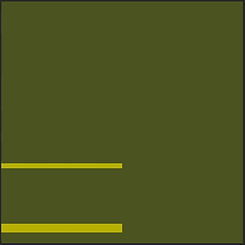
2) Before I exported layers as maps, I then used the Rectangle tool to create some stripes of the bomb, and then I merged the rectangle layers with a green background to create the Albedo Map.

Final Model
This is finished version of the asset from my ArtStation account.

bottom of page